ADJUSTMENT
Service Mode
Entering to Service Mode
 |
|
|
| ↓ | ||
 |
|
|
| ↓ | ||
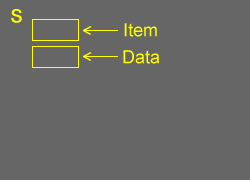
| Service Mode display | ||
 |
|
Key Function in the Service Mode
The following key entry during display of adjustment menu provides special functions.
| Selection of the adjustment items | CH  (on TV or remote control) (on TV or remote control) |
| Change of the data value | Volume +/- (on TV or remote control) |
| Adjustment menu mode ON/OFF | MENU button (on remote control) |
| Reset the count of operating protect circuit to "00" |
CALL + CH button on TV ( ) ) |
| "RCUT" selection | 1 button |
| "GCUT" selection | 2 button |
| "BCUT" selection | 3 button |
| "CNTX" selection | 4 button |
| "COLC" selection | 5 button |
| "UVTT" selection | 6 button |
| Self diagnostic display ON/OFF | 9 button |
Selecting the Adjusting Item
Every pressing of CH  button in the service mode changes the adjustment items in the order of table below. ( button for reverse order)
SETTING & ADJUSTING DATA
[ SERVICE MODE ]
ADJUSTING ITEMS AND DATA IN THE SERVICE MODE:
Note:
| (1) | The image system data may be different for each image format chosen. The factory preset data value is indicated in the table. (a) HOST-MICRO EEPROM data DRMA0492 (b) TV-MICRO EEPROM data DRMA0491 |
|
| (2) | Prior to changing any board containing an EEPROM IC, the exisiting data in each image format should be copied down as a precautionary measure. |
 |
Note: (*1) PC or 1080I/720P ColorStream/HDMI (*2) DigitalCH (ALL format) (*3) 480I/480P ColorStream/HDMI/DigitalCH (*4) 1080I/720P ColorStream/HDMI/DigitalCH (*5) PC Input |
| Item | Name of adjustment | Data HL196 / LX196 |
Remarks | ||
| HL196 | LX196 | ||||
| R-CUT | R CUTOFF | 00H | (a) | ||
| G-CUT | G CUTOFF | 00H | (a) | ||
| B-CUT | B CUTOFF | 00H | (a) | ||
| *R-DRV | G DRIVE | 7BH | (a) | ||
| G-DRV | G DRIVE | 7DH | (a) | ||
| *B-DRV | B DRIVE | 87H | (a) | ||
| BRTC | BRIGHTNESS CENTER | 72H : Sports | (a) | ||
| 74H : Standard | |||||
| 74H : Movie | |||||
| COLC | COLOR CENTER | B8H : Sports | (a) | ||
| 98H : Standard | |||||
| 88H : Movie | |||||
| B0H : Sports (*1) | |||||
| 90H : Standard (*1) | |||||
| 80H : Movie (*1) | |||||
| A0H : Sports (*2) | |||||
| 90H : Standard (*2) | |||||
| 80H : Movie (*2) | |||||
| B0H : Sports | NA | 47 only | |||
| 90H : Standard | NA | 47 only | |||
| 80H : Movie | NA | 47 only | |||
| A8H : Sports (*1) | NA | 47 only | |||
| 88H : Standard (*1) | NA | 47 only | |||
| 78H : Movie (*1) | NA | 47 only | |||
| 98H : Sports (*2) | NA | 47 only | |||
| 88H : Standard (*2) | NA | 47 only | |||
| 78H : Movie (*2) | NA | 47 only | |||
| UVTT | BASE BAND TINT | 80H | (a) | ||
| CNTX | CONTRAST MAX | FFH | (a) | ||
| SHRC | SHARPNESS CENTER | 60H : Sports | (a) | ||
| 50H : Standard | |||||
| 40H : Movie | |||||
| 50H : Sports (*3) | |||||
| 40H : Standard (*3) | |||||
| 30H : Movie (*3) | |||||
| 30H : Sports (*4) | |||||
| 20H : Standard (*4) | |||||
| 10H : Movie (*4) | |||||
| 00H : Sports (*5) | |||||
| 00H : Standard (*5) | |||||
| 00H : Movie (*5) | |||||
| VBIS | VBI Setting | F0H | (a) | ||
| CC | Closed Caption | 84H | (a) | ||
| ID1 | VBID | 80H : ANT1/2 | (a) | ||
| 88H : Others | |||||
| GG | Gemstar | C6H | (a) | ||
| *BYBK | B-Y OFF SET | 00H | (a) | ||
| *RYBK | R-Y OFF SET | 00H | (a) | ||
| OPT1 | TV SET OPTION 1 | 37H | (b) | ||
| OPT2 | TV SET OPTION 2 | 36H | (b) | ||
| OPT3 | TV SET OPTION 3 | 00H | (b) | ||
| MAGC | AGC of MTS decoder | 00H | (b) | ||
| VO1 | Volume1 Data | 59H | (b) | ||
| 5FH | NA | only | |||
| V25 | Volume25 Data | A7H | (b) | ||
| ADH | NA | only | |||
| V50 | Volume50 Data | D9H | (b) | ||
| DFH | NA | only | |||
| V75 | Volume75 Data | F3H | (b) | ||
| F9H | NA | only | |||
| V100 | Volume100 Data | F9H | (b) | ||
| FFH | NA | only | |||
| Item | Name of adjustment | Data HL196/LX196 |
Remarks | ||
| HL196 | LX196 | ||||
| VOLBS | Correction Volume at DTV | 06H | (b) | ||
| VOLST | Correction Volume at Stereo/SAP of ATV | 00H | (b) | ||
| EVOL | Reduce Volume For Bassboost (Nonuse) | 00H | (b) | ||
| VOLX | Volume Limiter For Hotel | 64H | (b) | ||
| BASX | Bass Max Data | 1AH | (b) | ||
| TREX | Treble Max Data | 1CH | (b) | ||
| TONN | Tone Min Data | 08H | (b) | ||
| BASC | Bass center Data | 01H | (b) | ||
| TREC | Treble center Data | 03H | (b) | ||
| 00H | NA | only | |||
| EBAS | Add Bass on FOCUS | 02H | (b) | ||
| 00H | NA | only | |||
| ETRE | Add Treble on FOCUS | 10H | (b) | ||
| 01H | NA | only | |||
| WON2 | Bass Reducer | 10H | (b) | ||
| ALS | ALS point | 00H | (b) | ||
| ALOF | Reduce in ALL (wow, TruSurround) off | 00H | (b) | ||
| VSTB | Reduce Volume For Stable Sound | 00H | (b) | ||
| VS3D | Reduce Volume For SRS3D | 00H | (b) | ||
| VFCS | Reduce Volume For FOCUS | 02H | (b) | ||
| 00H | NA | only | |||
| VTBH | Reduce Volume For TruBass High | 00H | (b) | ||
| VTBL | Reduce Volume For TruBass Low | 00H | (b) | ||
| VVDD | Reduce Volume For Dolby | 00H | (b) | ||
| WFCS | FOCUS Level | 02H | (b) | ||
| 01H | NA | only | |||
| WWSP | SRS 3D Level | 03H | (b) | ||
| 02H | NA | only | |||
| WTBH | TruBass High Level | 03H | (b) | ||
| WTBL | TruBass Low Level | 02H | (b) | ||
| VOLM | Volume coefficient at 1/2 Mute | 32H | (b) | ||
Adjusting the Data
Pressing of VOLUME or button will change the value of data in the range from 00H to FFH. The variable range depends on the adjusting item.
Exit from Service Mode
Pressing POWER button to turn off the TV once.
Self Diagnostic Function
- Press "Recall" button on Remote Control during display of adjustment menu in the service mode. This will bring up the "S" in the right corner of screen. Now press "9" button on remote.
The diagnosis will begin to check if interface among IC's is executed properly. - During diagnosis, the following displays are shown.
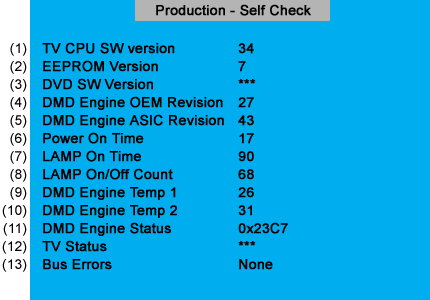
| (1) | Version information of TV-MICRO | : | Display 1 byte data. |
| (2) | Version information of TV-MICRO EEPROP | : | Display 1 byte data. |
| (3) | Version information of DVD MPU | : | HLV66, LX96 and HLV16 only (Not in used for HL66, HL196 and LX196) |
| (4) | Version information of DMD Engine OEM Revision | : | LCD Model not used. |
| (5) | Version information of DMD Engine ASIC Revision | : | LCD Model not used. |
| (6) | Total brightness hour of TV. | : | Display 4 bytes data. |
| (7) | Count the integrating lighting hour of lamp. | : | LCD Model not used. |
| (8) | Number of times of TV ON/OFF. | : | LCD Model not used. |
| (9) | Temperature display of thermo-Sensor. (DMD) | : | LCD Model not used. |
| (10) | Temperature display of thermo-Sensor. (LAMP) | : | LCD Model not used. |
| (11) | DMD Engine System status | : | LCD Model not used. |
| (12) | TV-MICRO System status | : | Not used |
| (13) | IIC-BUS status Bus line normal is "None" displayed. When it is abnormal, the block name is displayed as follows. "SCL-GND" (Red indication) : SCL-GND short circuit "SDA-GND" (Red indication) : SDA-GND short circuit "SCL-SDA" (Red indication) : SCL-SDA short circuit "NG : MTS" "NG : APRO" "NG : AVSW" |
LED Indication
The yellow, blue and red/green LED lights on the TV (at the bottom center of the TV) indicate the TV's status, as described below:
Note: If the TV loses A/C power (e.g., a power outage occurs or the power cord is unplugged), when power is restored, the yellow LED will blink while the TV is booting until the remote control is usable. This is normal and is not a sign of malfunction.
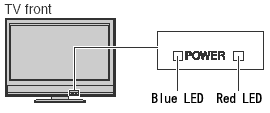
| LED Indication | Condition | ||||||
| 1 | Blue is ON (solid). | The TV is operating properly. | |||||
| -- | |||||||
| 2 | Red is ON (solid). | Recording is in progress. | |||||
| -- | |||||||
| 3 | Red blinks three times. | The TV is in rebooting. | |||||
| Check the Digital board. | |||||||
| 4 | Blue blinks slowly. | Abnormal operation of BUS line. | |||||
|
|||||||
| 5 | Blue blinks quickly. | Power Protect Detection. | |||||
| Check the cause that the protecting circuit of the power supply. | |||||||